The notification popped up: another month, another charge for that streaming service you barely use. Or maybe it's the frustration of staring at a cable bill, knowing you're probably paying too much. Sound familiar? In our digitally driven lives, managing personal finances can feel like wrestling an octopus – too many tentacles, too little time. This is precisely where apps like Rocket Money aim to step in, promising to streamline your financial life, cut unnecessary expenses, and even negotiate your bills.
But in a crowded market of financial tools, how does Rocket Money truly stack up? Is it a game-changer, or just another app making big promises? Let's dive deep into the Pros and Cons of Rocket Money, peeling back the layers to weigh its true value.
At a Glance: Rocket Money's Key Takeaways
Before we unpack everything, here's a quick snapshot of what you need to know about Rocket Money:
- Best for: People looking to easily identify and cancel unwanted subscriptions, get a clearer picture of their spending, and potentially lower recurring bills without much effort.
- Key Strength: Excellent at flagging recurring expenses and subscriptions, offering clear paths to cancel them.
- Unique Feature: Bill negotiation service, where they contact providers on your behalf to reduce rates.
- Major Drawback: The bill negotiation service comes with a significant upfront success fee (35%-60% of the first year's savings).
- Cost: Offers a robust free version. Premium features are on a sliding scale ($3-$12/month).
- Savings Account: Smart Savings feature (premium) helps you save, but accounts do not earn interest.
- Security: Connects to bank accounts via Plaid using bank-level 256-bit encryption for read-only access.
Understanding Rocket Money: Your Financial Navigator
At its core, Rocket Money (formerly known as Truebill) is a freemium budgeting application designed to bring clarity and control back to your finances. Think of it as a personal financial assistant that connects directly to your bank accounts and credit cards, giving you a bird's-eye view of your money. With over 10 million members and claims of helping users save over $2.5 billion, it's certainly made an impact.
The magic starts when Rocket Money connects to your bank accounts using Plaid, a secure technology trusted by thousands of financial apps. This provides the app with read-only access to your financial data, which means it can see your transactions and balances but cannot move money around. To keep your data safe, Rocket Money employs bank-level 256-bit encryption, and you always have the power to revoke sharing access through your bank at any time.
Once connected, Rocket Money gets to work, pulling in past transactions, categorizing your spending, and – crucially for many users – automatically highlighting those recurring charges and subscriptions that often slip under the radar. But beyond just showing you your money, Rocket Money offers various tools to help you take action.
The Free Tier: More Than Just a Glimpse
For many, the free version of Rocket Money offers a compelling suite of tools that can significantly improve financial awareness without costing a dime. It's not just a teaser; it's a genuinely useful starting point for anyone looking to get a better handle on their finances.
Here's what you get:
- Financial Tracking: Daily updated balances and a clear view of your transactions across all linked accounts. This alone can be incredibly insightful, providing a single dashboard for your entire financial landscape.
- Spending Breakdowns: Get a monthly summary of where your money is going, categorized automatically. While initial categorization might require some manual cleanup (more on that later), it quickly offers a high-level view of your spending habits.
- Subscription & Bill Oversight: This is arguably the free version's biggest strength. Rocket Money excels at identifying all your recurring charges – from Netflix to gym memberships – presenting them clearly. It also flags upcoming bills, so you're never caught off guard. Even better, it provides straightforward instructions for canceling any identified subscriptions, empowering you to cut ties with unused services yourself. For more insights on managing your recurring charges, the app provides excellent guidance.
- Basic Budgeting Tools: You can set simple budgets and track against them. While customization is limited (allowing for only two custom categories), it's a practical foundation for basic financial planning.
- Balance Alerts: Stay informed with notifications about your linked account balances.
- Credit Score Access: Keep an eye on your financial health with access to a basic credit score, sourced from Experian.
- Outlier Purchase Marking: Easily mark large, non-recurring expenses (like a new appliance) as "outlier purchases" to prevent them from distorting your regular budget analysis.
The free version alone is a strong contender for anyone who hasn't actively managed subscriptions or truly understood their spending patterns. It provides the visibility you need to start making informed decisions.
Stepping Up to Premium: Is the Upgrade Worth It?
Rocket Money's premium version adds a layer of convenience and expanded functionality, available on a sliding scale typically ranging from $3 to $12 per month. You get to choose your payment amount, making it feel somewhat flexible. A 7-day free trial lets you test the waters.
So, what does that extra cash buy you?
- Cancellation Concierge: This is the flagship premium feature. Instead of just giving you instructions, Rocket Money's team will handle subscription cancellations on your behalf. No more navigating convoluted customer service menus or endless hold times. Crucially, there's no additional success fee for this service beyond your premium subscription.
- Enhanced Credit Monitoring: Beyond the basic score, premium users get full credit reports and ongoing credit monitoring, helping you stay on top of your credit health.
- More Frequent Syncing: Your accounts update more often, providing a near real-time view of your finances throughout the day.
- Shared Account Access: Useful for couples or partners who want to manage their finances together under one Rocket Money account.
- Dedicated Chat Support: Get quicker assistance during business hours if you run into any issues or have questions.
- Data Export Tools: For those who like to crunch numbers or need detailed expense tracking for tax purposes, the ability to export your financial data is invaluable.
- Smart Savings: This feature lets you automate goal-based transfers to an FDIC-insured partner bank account. It's excellent for setting aside money for specific targets (e.g., down payment, vacation fund). However, a significant caveat here: these savings do not earn interest. We'll delve into the implications of this later. If you're looking for high-yield savings options, you'll need to explore alternatives.
- Unlimited Customization: Break free from the two-category limit. Premium allows for unlimited custom budgeting categories, custom dashboards, tags, rules, manual transactions, and transaction editing, offering much more granular control over your budget.
- iPhone Widget & Web Access: Access your financial insights conveniently from your iPhone home screen or a broader view on your computer.
The premium features clearly offer a more hands-off and customizable experience. Whether it's worth the monthly fee depends on how much you value the convenience and depth it provides, especially the Cancellation Concierge.
The Bill Negotiation Service: A Double-Edged Sword
This particular feature often sparks the most discussion, for both good and bad reasons. Available to all Rocket Money users (free and premium), the bill negotiation service allows Rocket Money to contact your service providers – think cable, internet, cell phone, or home security – to negotiate a lower rate on your behalf.
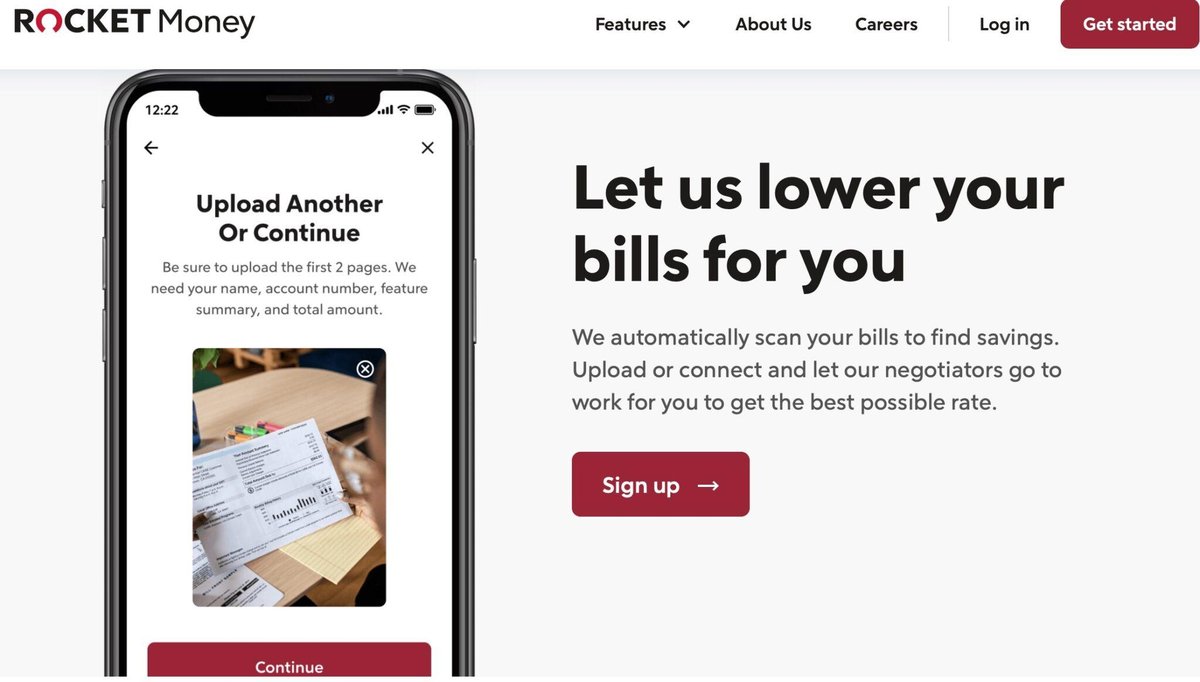
Here's how it typically works: You either connect your account or provide a PDF of your bill. Rocket Money then uses its expertise and leverage to try and secure a discount. If they succeed, you get to keep the savings.
Sounds amazing, right? It can be. Users have genuinely reported significant savings, sometimes hundreds of dollars a year. For example, if Rocket Money negotiates a $20 monthly discount on your internet bill, that's $240 in annual savings.
The catch, and it's a big one, is the fee. If a negotiation is successful, Rocket Money charges an upfront lump sum fee of 35% to 60% of the first year's savings. Using our $20 monthly discount example ($240 annual savings), at a 35% rate, you'd pay an $84 upfront fee. The fee percentage within this range is often chosen by the user, with 40% typically being the default suggestion.
This upfront fee model is a common source of user complaints and can be a stumbling block for many. While it does save you effort, the cost can feel steep, especially when you consider that negotiating bills on your own is often possible with a bit of time and persistence. Many financial experts recommend using Rocket Money to identify potential savings then attempting to negotiate independently to avoid the fee.
Rocket Money's Strengths: Where It Truly Shines
Let's break down the primary advantages that make Rocket Money a compelling financial tool:
- Unparalleled Subscription Management: This is, hands down, Rocket Money's killer feature. It's incredibly effective at uncovering forgotten subscriptions, helping you stop the slow bleed of recurring charges. Whether you use the free version to get cancellation instructions or the premium Cancellation Concierge, this feature alone can often justify using the app.
- Crystal-Clear Financial Visibility: By consolidating all your accounts into one dashboard, Rocket Money provides an immediate and comprehensive overview of your spending, income, and overall financial health. For those who feel overwhelmed by multiple bank and credit card statements, this clarity is invaluable.
- Potential for Significant Savings (Bill Negotiation): Despite the fee structure, the bill negotiation service can genuinely save you money. For users who lack the time, patience, or confidence to negotiate themselves, Rocket Money offers a convenient way to reduce recurring expenses.
- Robust Free Version: Unlike many apps that offer minimal functionality for free, Rocket Money's free tier is powerful enough to provide substantial value, making it an excellent entry point for basic financial tracking and expense identification.
- Strong Security Protocols: With Plaid integration and 256-bit encryption, users can generally feel secure linking their accounts. The read-only access further limits potential risks, and the ability to revoke access at any time puts control firmly in your hands. For more on securing your financial data, these protocols are standard in the industry.
- Intuitive Interface: The app is generally user-friendly, with a clean design that makes navigating your finances less daunting.
The Downsides to Consider: Where Rocket Money Falls Short
No tool is perfect, and Rocket Money has its limitations and areas that warrant careful consideration:
- The Bill Negotiation Fee Structure: This is frequently cited as the biggest con. Paying 35% to 60% of your first year's savings upfront can feel like a steep price, especially when the alternative is a phone call you could make yourself. The lump sum payment, rather than a monthly percentage, can also feel significant.
- Smart Savings Doesn't Earn Interest: While the automated savings feature is great for building discipline, the fact that the funds don't earn interest means your money isn't working as hard as it could be. You'd get better returns by using Rocket Money to determine your savings capacity and then manually transferring those funds to a high-yield savings account or investment vehicle.
- Basic Budgeting Limitations (Free Version): While functional, the free budgeting tools are quite basic. If you're looking for granular control over dozens of categories or highly detailed budget planning, you might find it restrictive. Initial transaction categorization, while automated, often requires manual tweaking to ensure accuracy.
- Overdraft Fee Negotiation: Rocket Money does not negotiate overdraft fee refunds directly with banks. Instead, it provides guidance for users to attempt these negotiations themselves, which might disappoint those hoping for an all-encompassing negotiation service.
- Value of Some Premium Features: While robust, some premium features like credit monitoring are available through various other free or lower-cost services. Whether the added convenience of having it within Rocket Money justifies the premium fee is subjective.
- Potential for Inaccurate Categorization: Like many automated budgeting apps, Rocket Money's initial categorization of transactions might not always be perfect. This can require a bit of manual cleanup, especially early on, to ensure your budget reflects your actual spending accurately.
Making It Work for You: Actionable Strategies & Best Practices
So, how can you best leverage Rocket Money to improve your financial life?
- Start with the Free Version (Seriously): If you're new to budgeting or haven't actively reviewed your subscriptions, the free tier is an absolute must-try. It's fantastic for shining a light on where your money is going and flagging those recurring expenses. You might be surprised by what you find!
- Act on Subscription Insights: Don't just look at the list of subscriptions; act on it. Use the free version's instructions to cancel unused services. If you're premium, engage the Concierge. Even canceling one or two services can quickly offset the cost of the premium subscription.
- Think Critically About Bill Negotiation: Use Rocket Money to identify potential savings on your bills. Then, weigh your options:
- DIY First: Many experts recommend calling your provider yourself. Explain you're considering switching providers and ask if they can match competitor rates or offer a discount. This often works and costs you nothing but time.
- Consider Rocket Money if: You truly despise phone calls, lack the time, or have tried negotiating yourself without success. Factor in that upfront fee before proceeding. Remember, even a high fee like 60% might be worth it for a significant, ongoing discount if you just won't do it yourself.
- Pair Smart Savings with High-Yield Accounts: If you use the premium Smart Savings feature, treat it as a disciplined way to set aside money. Once funds are accumulated, manually transfer them to a high-yield savings account or a low-risk investment to ensure your money is growing.
- Supplement Budgeting if Needed: For intricate daily budgeting or detailed expense tracking beyond basic categories, consider pairing Rocket Money with a more specialized budgeting app like Monarch Money or YNAB (You Need A Budget), which offer highly granular control. For those comparing different budgeting apps, understand that each has its niche.
- Regularly Review Your Financial Health: Make it a habit to check your Rocket Money dashboard. Consistent review helps you spot trends, prevent overspending, and ensure you're on track with your financial goals.
Common Questions About Rocket Money
Let's address some of the most frequently asked questions directly:
Is Rocket Money safe to use?
Yes, Rocket Money uses industry-standard security protocols. It connects to your bank accounts via Plaid, which employs bank-level 256-bit encryption. Access is read-only, meaning Rocket Money can see your financial data but cannot move money or make transactions from your accounts. You can also revoke access through your bank at any time.
How much does Rocket Money cost?
Rocket Money offers a free version with core features like financial tracking, subscription identification, and basic budgeting. Premium features typically range from $3 to $12 per month, with users choosing their preferred amount. The bill negotiation service, available to all users, charges an upfront success fee of 35% to 60% of the first year's savings only if they successfully lower your bill.
Can Rocket Money really save me money?
Absolutely. Rocket Money is highly effective at identifying forgotten or unused subscriptions, which can lead to immediate savings if canceled. Its bill negotiation service also has a track record of securing lower rates for users, though the associated fee should always be considered.
Does Rocket Money's Smart Savings feature earn interest?
No, the funds held in a Rocket Money Smart Savings account (which is an FDIC-insured partner bank account) do not earn interest. It's a tool for automated saving and goal setting, but for growth, you should transfer these funds to an interest-bearing account.
How does Rocket Money compare to other budgeting apps?
Rocket Money excels at subscription management and bill negotiation. For basic financial tracking and identifying recurring expenses, its free version is excellent. For highly detailed, envelope-style budgeting or advanced financial planning, apps like YNAB or Monarch Money might offer more granular control and features, often at a higher monthly cost.
The Bottom Line: Is Rocket Money the Right Financial Tool for You?
When considering the Pros and Cons of Rocket Money, it's clear the app offers substantial value, particularly for those struggling with subscription bloat or seeking a clearer picture of their spending. Its free version is a powerful entry point, offering enough functionality to help many users get their finances in order.
If you're someone who often forgets about recurring charges, dreads calling customer service, or simply needs a consolidated view of your money, Rocket Money is highly recommended. The potential savings from subscription cancellations alone can be significant, and the convenience of the bill negotiation service, while costly, can be a game-changer for some.
However, if you're a meticulous budgeter who thrives on manual control, already uses a high-yield savings account, or enjoys the challenge of negotiating bills yourself, some of Rocket Money's premium features might offer diminishing returns. For a deeper dive into its overall value, you might ask yourself, Is Rocket Money truly worth it?
Ultimately, Rocket Money empowers you with information and tools. Start with the free version, see what insights it uncovers, and decide from there if the premium features or bill negotiation service align with your financial goals and personal preferences. Taking control of your money starts with understanding it, and Rocket Money offers a compelling way to begin that journey.